Carros Rebaixados BR Controls
Master driving, transmission, safety systems, lights, and signals for clean parks and meetup clips.
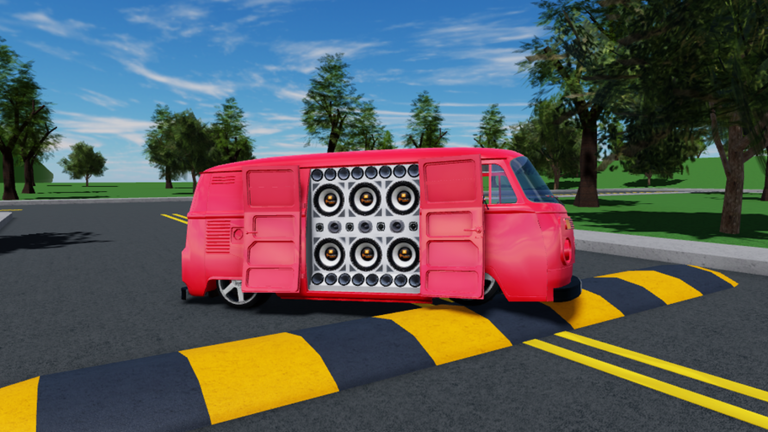
Clean control habits matter more in Carros Rebaixados BR than raw speed. The experience is a social lowered-car and car-audio sandbox by godxlikee, still in Pre-Alpha, so the fantasy is cruising, parking in formation, and looking intentional on camera—not winning a race. This page documents the PC keyboard layout, explains how transmission and clutch fit together, covers TCS and ABS, and notes how mobile players should think about the same actions at a high level. Pair it with Getting Started if you have not spawned a car yet, and with Customize Cars once you can park at the repair shop without rolling into other vehicles.
PC driving basics
| Action | Default key | Why it matters |
|---|---|---|
| Steer / move | WASD or Arrow keys | Primary locomotion in every car |
| Handbrake | P | Tight parks, quick stops, photo poses |
| Horn | F | Meetup callouts and courtesy taps |
| Headlights | H | Night sessions and video lighting |
| Left signal | Z | Lane changes and staged arrivals |
| Right signal | C | Mirror the left signal for clean clips |
| Hazards | X | Parked speaker walls and breakdown looks |
Start every session with a thirty-second warm-up in an empty lot: throttle gently, brake early, then practice a handbrake stop into a marked parking gap. Lowered cars in this culture are meant to look planted; jerky inputs read as messy on stream even when you “make” the turn.
Transmission, clutch, and gear shifts
Carros Rebaixados BR exposes a more sim-flavored sheet than many Roblox driving games:
| Action | Default key | Notes |
|---|---|---|
| Transmission mode | M | Toggle how the gearbox behaves for your preference |
| Clutch | Left Shift | Hold when you intend a deliberate shift |
| Shift up / down | E / Q | Pair with clutch timing for smoother pulls |
Practical transmission tips
- Learn automatic comfort first. If you are brand new, stay in the easier transmission feel until you can park and convoy without stalling your brain on UI icons.
- Use clutch on purpose. Mash-shifting without Left Shift feels sloppy; a short clutch press before E / Q keeps revs and roleplay believable for meetup videos.
- Downshift before a show park. Approaching a speaker line, ease speed with brakes, tap clutch, drop a gear, then handbrake (P) for the final plant.
- Do not chase redline in crowded lots. The VW Polo GTI is the fastest car in the current roster—save that energy for open roads, not repair-shop forecourts.
- Rehearse the same sequence. Muscle memory (brake → clutch → gear → handbrake → hazards) makes group formations look coordinated.
If a patch rebinds keys during Pre-Alpha, re-open this page after reading Updates and re-test in a quiet server before hosting friends.
Safety systems: TCS and ABS
| System | Default key | Role |
|---|---|---|
| TCS (traction control) | T | Helps limit wheelspin when you punch throttle |
| ABS (anti-lock braking) | Y | Helps keep steering authority under hard braking |
When to leave aids on
- Wet-looking pavement, downhill approaches to the shop, or first drives in a new chassis.
- Convoy driving with friends behind you—predictable braking protects the whole line.
- Learning the Fiat Uno Mille or VW Gol GL G3 before you jump into quicker metal.
When players toggle aids off
- Filming dramatic launches or handbrake slides where wheelspin is part of the shot.
- Practicing advanced parks in an empty lot (never in a packed meetup).
- Comparing feel between cars for the Tier List discussion.
Toggle T and Y deliberately; announce changes in voice chat if you are leading a convoy so nobody is surprised by a different braking distance.
Lights, signals, and meetup body language
Visual signaling is part of Brazilian car-meet etiquette inside the game:
- Headlights (H) — turn on for dusk sessions and thumbnail lighting.
- Signals (Z / C) — use when leaving a wall of cars so foot traffic knows your intent.
- Hazards (X) — classic “we are parked / speakers out” look for a paredão line.
- Horn (F) — one tap to say hello; avoid spam at spawn.
Combine hazards with open door speakers on supported cars when you settle into a music circle. The control sheet and the audio fantasy reinforce each other: you look parked on purpose, not abandoned mid-turn.
Mobile and touch differences (high level)
Mobile players use on-screen sticks and buttons instead of the keyboard table above. Expect these high-level differences:
- Steering and throttle map to virtual joysticks or zones rather than WASD.
- Secondary actions (lights, hazards, transmission helpers) usually sit in expandable button clusters—look for icons that match the PC verbs even if labels differ.
- Precision parks are harder on small screens; roll up slower and leave extra gaps in meetup lines.
- Clutch + gear combos may feel heavier on touch; many mobile players stay on the simpler transmission mode for social sessions.
- UI spawn and share still matter: car spawn remains a left-side control fantasy, while inviting friends still flows through the Share pattern on the right—confirm icon positions after each Pre-Alpha UI tweak.
If you switch between phone and PC, practice the same parking routine on both so muscle memory transfers even when the input hardware changes.
Suggested practice routine (10 minutes)
- Spawn a forgiving car (Fiat Uno Mille) via the left car icon (Getting Started).
- Drive a slow rectangle using only throttle, steer, and brake—no handbrake yet.
- Add P handbrake stops into painted bays or open asphalt.
- Toggle H, Z, C, and X while stationary so you never hunt keys mid-meetup.
- Press T and Y once each to confirm TCS/ABS state, then leave them on for the next convoy.
- Try M transmission mode and a few Left Shift + E/Q shifts on an empty road.
- Drive to the repair shop, park cleanly, and enter customization (Customize Cars).
- Invite one friend with Share and repeat a two-car parallel park.
Finish by reading How to Play Music so your first loud session does not start with chaotic volume while you are still learning brakes.
Common mistakes
- Handbrake as a panic button only. Use P early and gently for show parks.
- Ignoring signals in group clips. Editors notice missing Z/C/X work.
- Max speed near the shop. Polo GTI pace belongs on open asphalt.
- Fighting the clutch on mobile. Simplify transmission mode until touch aim improves.
- Turning ABS off in a full lot. One slide can scatter an entire speaker wall.
Related pages
- Getting Started — spawn, invite, first-hour loop.
- Customize Cars — repair-shop looks after you can park.
- How to Play Music — Volume, Bass Boost, Distortion etiquette.
- Tier List — which cars feel best for cruise vs. display.
- Guides Hub — full tutorial index.
- Updates — Pre-Alpha changes that may move bindings or UI.
Mastering controls will not give you a trophy screen—this game has no win condition—but it will make every meetup look intentional. Smooth inputs, clear lights, and predictable braking are what separate a random lobby from a real Carros Rebaixados BR session.
Frequently Asked Questions
Quick answers for lowered-car meets and music setups.
What is the handbrake key on PC?
Press P for the handbrake. Use it for tight parking spots and final plants when you join a meetup line.
How do clutch and gears work?
Hold Left Shift as the clutch, use E and Q to shift, and press M to change transmission mode. Practice the sequence on an empty road before using it in crowded lots.
What do T and Y do?
T toggles TCS (traction control) and Y toggles ABS. Keep both on while learning or driving in convoys; turn them off only for controlled film stunts in empty space.
Are mobile controls the same as PC?
Mobile uses on-screen sticks and buttons for the same actions—drive, lights, hazards, and transmission helpers—but precision parks are harder. Slow down and leave wider gaps in meetup lines.
Which car should I practice controls in?
Start with Fiat Uno Mille or VW Gol GL G3. Save the faster VW Polo GTI for open roads after your parking routine feels consistent.