Carros Rebaixados BR Getting Started
Join the Pre-Alpha, spawn your first lowered car, invite friends, and start a music meetup in minutes.
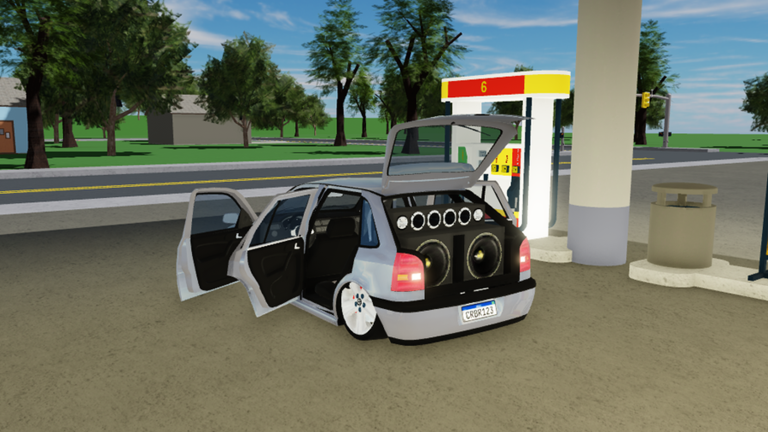
Carros Rebaixados BR is a free Roblox experience by godxlikee that recreates Brazilian lowered-car culture and car-audio meetups. There is no scoreboard and no win condition—your session is about cruising, parking with friends, tuning looks at the repair shop, and blasting music through car speakers. The place is still labeled Pre-Alpha (place ID 3242417672), so systems can change, but the core loop already feels complete enough for long social sessions. This walkthrough gets you from first join to a confident first meetup without missing the UI buttons that veterans already know by heart.
If you want a hub of every tutorial on this wiki, start at the Guides Hub after you finish this page. For keyboard maps, jump ahead to Controls. For paint, wheels, and speaker culture, use Customize Cars. For audio IDs and EQ etiquette, open How to Play Music.
Join the experience
- Open Roblox and search for Carros Rebaixados BR, or use the official game link from this wiki’s home page.
- Confirm you are entering the free place by godxlikee—the title often shows a Pre-Alpha tag.
- Allow the experience to load assets. On first join you may see a short wait while cars and map pieces stream in.
- Land in the map as your avatar. Look at the left side of the screen for the car spawn icon and at the right side for the Share / invite control.
You do not need a premium membership to drive the starter roster. Everything that matters for day one—spawning, driving, inviting friends, repairing/customizing, and playing music—is available in the free client.
Spawn your first car
Cars spawn from the car icon on the left UI. Tap or click it, then pick a model from the current Pre-Alpha garage. Expect Brazilian classics and lowered favorites such as:
- Fiat Uno Mille — approachable daily driver for learning streets and parking.
- Fiat Uno Mille (Escada) — the ladder/roof variant that stands out in photo lines.
- VW Polo GTI — currently the fastest option for straight-line cruising.
- VW Kombi — van energy for group hangs and loud setups.
- VW Gol GL G3 — classic Gol silhouette that fits the culture perfectly.
- VW Saveiro Cross G5 — pickup style for a different stance and meetup look.
Pick something simple for your first five minutes (Uno or Gol) so you can focus on camera, braking, and UI instead of speed. Once the car appears, walk up, enter the driver’s seat, and take a slow lap around the spawn area before you chase friends across the map.
First drive checklist
Treat the opening minutes like a systems check:
- Steer and throttle with WASD or arrow keys on PC. Ease into throttle—some cars feel lively even at low speed.
- Practice handbrake (P) in an empty lot so you learn how the car rotates when you need a tight park.
- Toggle headlights (H) and try turn signals (Z / C) plus hazards (X) so nighttime meetups look intentional.
- Tap the horn (F) once to confirm audio works before you open a full music session.
- If your car supports it, click the door to open the speaker panel aesthetic—this is part of the “paredão” meetup vibe, not just decoration.
Detailed binding tables live on the Controls page, including clutch, gears, TCS, and ABS. Bookmark that page if you plan to drive manual or film clips.
Invite friends and fill a meetup
Carros Rebaixados BR is built for groups. Use the Share button on the right of the HUD to invite Roblox friends into your server. A short invite loop that works well:
- Spawn and park in a wide, visible spot (avoid blocking spawn exits).
- Share the place with two or three friends first—small groups load cleaner during Pre-Alpha.
- Agree on a meeting landmark (repair shop frontage, a parking strip, or a scenic overlook).
- Once everyone arrives, form a line or circle of cars with doors/speakers open for screenshots.
There is no ranked mode and no match timer. If the lobby feels empty, hop servers or invite again. Community pages under Players and patch notes under Updates help you track when new maps or social features land.
Find the repair shop
Customization happens at the repair shop. Drive until you locate the shop building on the current Pre-Alpha map, park nearby, and interact with the shop flow to change looks. Day-one goals inside the shop:
- Apply a bold color that reads well in Roblox lighting.
- Try different wheels so the stance matches the lowered theme.
- Prep speaker-focused cars for music sessions later.
You do not need a perfect build on visit one. Grab a clean look, leave, and come back after you decide whether you are building a quiet cruiser or a loud meetup wall. Deep tips for stance, speaker culture, and photo spots are in Customize Cars. When you want meta opinions on which chassis feels best right now, cross-check the Tier List.
Music basics on day one
Audio is half the fantasy. After you can park cleanly:
- Open the in-game music player.
- Start with a built-in track so you learn Volume, Bass Boost, and Distortion without hunting IDs.
- Nudge Volume first, then add a little Bass Boost. Treat Distortion as seasoning—too much muddies everyone’s session.
- On supported cars, open the door speakers so the visual matches the sound.
- When you are ready for custom funk, sertanejo, or phonk playlists, paste Roblox audio IDs from the community list at Music IDs and follow the full workflow in How to Play Music.
Meetup etiquette matters even on day one: do not grief spawn with maxed distortion, leave space for other cars, and lower volume if someone is recording dialogue or explaining controls.
What to do next
Once the first hour feels comfortable, rotate through these goals:
- Learn the full control sheet — clutch, transmission toggle, TCS, and ABS for cleaner parks and clips (Controls).
- Build a signature look — color, wheels, and speaker presentation at the repair shop (Customize Cars).
- Host a mini paredão — three or more cars, doors open, coordinated playlist (How to Play Music).
- Compare cars — try Polo GTI for speed runs, then return to Uno/Gol for chill hangs (Tier List).
- Watch Pre-Alpha notes — a new map is expected; check Updates so you know when landmarks move.
- Stay safe with scripts — if you explore client tools, read Scripts carefully and never share account credentials.
- Claim anything code-related — promo drops are rare; music IDs are the everyday “codes” players share via Codes and Music IDs.
Pre-Alpha expectations
Because the game is still Pre-Alpha, expect occasional UI moves, car list changes, and map reshuffles. Features described here match the current social-driving fantasy: free entry, left-side car spawn, right-side share, repair-shop customization, speaker doors on some cars, and a music player with Volume / Bass Boost / Distortion. If something in your client differs after a patch, re-check Updates and re-walk the spawn → drive → shop → music loop.
Quick reference card
| Goal | Where / how |
|---|---|
| Spawn a car | Car icon on the left UI |
| Invite friends | Share on the right UI |
| Customize | Drive to the repair shop |
| Open speakers | Click the door on supported cars |
| Music EQ | Volume, Bass Boost, Distortion sliders |
| Fastest feel | VW Polo GTI (current roster) |
| Next guides | Controls, Customize, Music |
You are ready when you can spawn, park without panic, invite one friend, visit the shop once, and play a track without overpowering the lobby. Everything else—stance perfection, ID hunting, and big meetups—builds on that foundation.
Frequently Asked Questions
Quick answers for lowered-car meets and music setups.
Is Carros Rebaixados BR free to play?
Yes. The Roblox place by godxlikee is free to enter. You can spawn cars, drive, invite friends, use the repair shop, and play music without paying to start.
How do I spawn a car?
Use the car icon on the left side of the UI, pick a model such as Fiat Uno Mille or VW Gol GL G3, then enter the vehicle when it appears.
Where do I customize my car?
Drive to the repair shop on the map and use the shop flow for colors, wheels, and other visual options. See the Customize Cars guide for meetup styling tips.
How do I invite friends?
Use the Share button on the right side of the HUD to bring Roblox friends into your server, then agree on a parking spot for the meetup.
Is there a way to win the game?
No. Carros Rebaixados BR is a social driving and car-audio meetup experience. Sessions end when your group is done cruising, posing, and playing music.