How to Play Music in Carros Rebaixados BR
Use built-in tracks or Roblox audio IDs, tune bass and distortion, and keep meetup etiquette respectful.
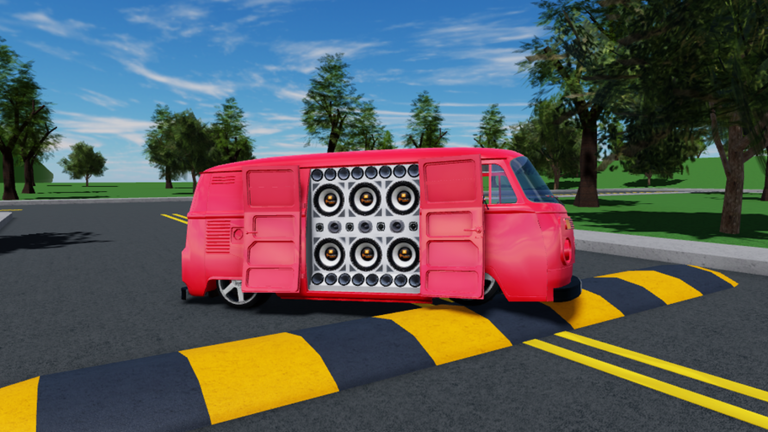
Music is the second half of Carros Rebaixados BR. The free Roblox experience by godxlikee recreates Brazilian lowered-car culture and car-audio meetups, still marked Pre-Alpha, with no scoreboard and no win condition. If driving gets you across the map, audio is why people stay parked in a wall of cars at midnight. This guide covers how the music player works, when to use built-in tracks versus Roblox audio IDs, how to set Volume, Bass Boost, and Distortion, how door speakers fit the fantasy, and how not to grief the lobby. New players should skim Getting Started first; stylists should finish a shop visit via Customize Cars before hosting a loud set.
What “playing music” means here
You are not unlocking a rhythm minigame. You are powering a social scene:
- Spawn a car from the left UI car icon.
- Park with intent (handbrake, hazards—see Controls).
- On supported cars, click the door so speakers open.
- Open the music player and start a track.
- Shape the EQ with the three core sliders.
- Invite friends with the Share button on the right when you want a full paredão.
The fantasy succeeds when sound, stance, and parking agree. Blasting audio while sideways across spawn fails the culture even if the song is perfect.
Built-in tracks vs Roblox audio IDs
Built-in tracks
Use the experience’s included songs when you want zero friction:
- Ideal for first sessions while you learn slider ranges.
- Useful when ID lists are outdated after a Roblox audio moderation wave.
- Great for quick lobby tests—“is my speaker door open?”—without pasting numbers.
Start every new car with a built-in track for thirty seconds. Confirm you hear output, then escalate to custom IDs.
Roblox audio IDs
Custom culture lives in audio IDs: numeric (or asset) codes that point at Roblox-hosted sounds. Players share funk, phonk, sertanejo, and meetup edits the same way other games share promo codes. On this wiki, the living list belongs on Music IDs under the Codes section—bookmark it beside this guide.
Typical ID workflow
- Copy a working ID from Music IDs or a trusted friend.
- Open the in-game music player.
- Paste or enter the ID in the custom audio field.
- Play at low Volume first.
- Raise Bass Boost slowly; add Distortion only if the track still feels clear.
- If the ID is silent or errors, retire it—Roblox may have removed the asset—and try the next code on the list.
Never assume an ID lasts forever. Pre-Alpha UI plus platform audio rules means lists need refreshes; check Updates when large patches land.
The three sliders that matter
| Slider | What it does | Practical advice |
|---|---|---|
| Volume | Overall loudness | Set this first; everything else multiplies it |
| Bass Boost | Low-end weight | Signature “paredão” feel—raise in small steps |
| Distortion | Grit / breakup | Easy to overdo; keep intelligible for vocals |
Suggested starting presets
- Cruise — Volume mid-low, Bass Boost light, Distortion off. Conversation stays possible.
- Meetup wall — Volume mid, Bass Boost medium, Distortion low. Doors open, hazards on.
- Thumbnail flex (short) — Slightly higher Bass Boost for a 10-second clip, then return to meetup preset so you do not punish the lobby.
If someone asks you to turn it down, do it immediately. Social driving games die when one player treats the server like a private club.
Speaker doors and visual audio
Some cars let you click the door to open a speaker presentation. That click is not only cosmetic—it sells the idea that the sound has a source. Pair it with:
- Shop colors that contrast the speaker mouths (Customize Cars).
- A stable park using P and X.
- Friends aligned into a true wall, not a random cluster.
Kombi and pickup silhouettes (VW Kombi, VW Saveiro Cross G5) often read louder in screenshots; Uno and Gol lines can look tighter and more street. Pick the chassis that matches the set you want to host, then confirm driving feel on the Tier List.
Etiquette: loud without griefing
Car-audio culture is generous; grief audio is not. Follow these rules every session:
- Do not max all three sliders at spawn. Load in, move to a meet strip, then go loud.
- Leave lanes open. A wall of sound still needs a drive-through gap.
- Respect creators filming tutorials. Drop Volume if someone is voice-over recording controls.
- Rotate tracks. Five minutes of the same distorted loop clears lobbies.
- Ask before stacking IDs. Three cars on different songs at full Bass Boost is chaos, not a meet.
- No account scams. Anyone offering “private script music unlocks” belongs in the caution pile—read Scripts for safety context, and never share passwords.
- Keep Share invites honest. Bring friends who want the scene; do not bait people into ear-damage jokes.
Etiquette is how Pre-Alpha communities survive until the new map and future tools arrive.
Hosting a first music meetup (checklist)
- Invite two friends with the right-side Share control.
- Agree on a parking landmark away from the busiest spawn choke point.
- Arrive in customized cars—color and wheels already done.
- Open doors on supported cars; flip hazards.
- Start a built-in track to sync everyone’s hearing.
- Switch the host car to a vetted ID from Music IDs.
- Set Volume → Bass Boost → Distortion in that order.
- Take screenshots, swap one ID, then cruise together before another park.
That loop teaches systems without burning the lobby.
Troubleshooting silence
| Symptom | Likely fix |
|---|---|
| No sound at all | Check Roblox client volume and the in-game Volume slider |
| ID does nothing | Asset removed or mistyped—try another code from the music list |
| Sound exists but thin | Raise Bass Boost slightly; confirm you are near the car |
| Muddy mess | Lower Distortion first, then Volume |
| Friends hear you, you do not | Restart client audio or rejoin; Pre-Alpha quirks happen |
| Everyone angry in chat | You griefed—apologize and turn down immediately |
How this page connects to the rest of the wiki
- Music IDs — the codes players actually paste.
- Codes — hub for redeemables and audio-code culture.
- Customize Cars — make the speaker wall look intentional.
- Controls — park cleanly before you go loud.
- Getting Started — spawn, Share, first-hour path.
- Updates — patch notes when player UI or maps move.
- Guides Hub — full tutorial index.
Mindset for Pre-Alpha audio
Systems can shift: slider labels, ID fields, even which cars open doors. What should not shift is the social contract—music supports the meetup; it does not replace consent or spatial awareness. Keep a calm cruise preset, a meetup preset, and a short flex preset. Know how to reach Music IDs when friends ask “what song is that?” and know how to turn down without ego.
When your Volume is controlled, your Bass Boost is purposeful, your Distortion is rare, your doors are open, and your parking line is tight, you are playing Carros Rebaixados BR as a car-audio hangout—not as a noise cannon. That is the entire skill.
Frequently Asked Questions
Quick answers for lowered-car meets and music setups.
How do I play custom songs?
Open the music player and enter a Roblox audio ID. Start with verified codes from the Music IDs page, play at low Volume, then adjust Bass Boost and Distortion.
What do Bass Boost and Distortion do?
Bass Boost adds low-end weight for that paredão feel. Distortion adds grit. Raise Bass Boost gradually and keep Distortion low so vocals and melody stay clear.
Where do I find working music IDs?
Use the community list on the Music IDs page under Codes. IDs can break when Roblox removes audio, so retry fresh codes if a track is silent.
How do I avoid annoying other players?
Do not max Volume, Bass Boost, and Distortion at spawn. Park in a meetup spot, leave lanes open, and turn down immediately if anyone asks.
Do I need open doors for music to work?
Audio can play without the door animation, but on supported cars you should click the door to open speakers so the visual matches the sound for screenshots and meets.